

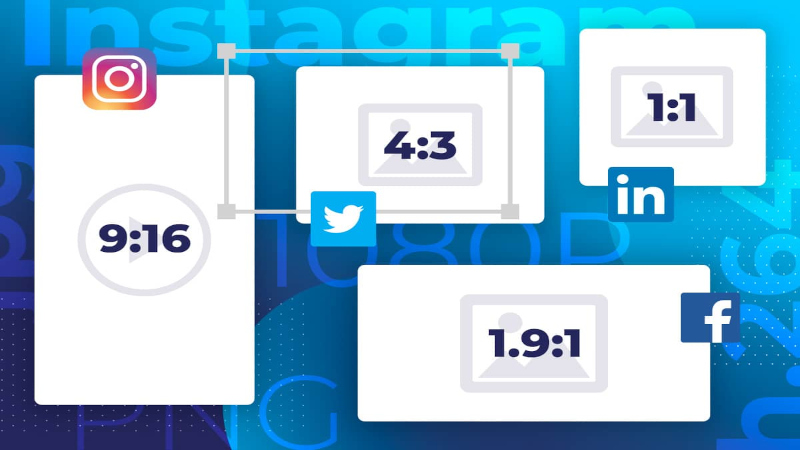
When downloading a video, people often think first about the file format: MP4, WEBM, AVI, or MOV. Yet another element is just as important for producing a pleasant-to-watch video: the display format, also called aspect ratio. It determines whether the video is vertical, horizontal, square, suited to phone, computer, TV, or social media.
You've probably encountered this problem: a downloaded video shows large black bars, part of the image is cropped, someone's face disappears off the side, the video looks squashed, or it doesn't properly fill your smartphone screen. In most cases, it's not necessarily a download issue. It's often a matter of aspect ratio.
Today videos circulate everywhere: YouTube, TikTok, Instagram, Facebook, WhatsApp, computer, tablet, TV, vertical screen, horizontal screen. Each use has its own preferences. A video made for a smartphone doesn't display the same way as a video made for a TV. A horizontal video can be perfect on a PC but poorly suited to a Story or a Reel. Conversely, a vertical video can be ideal on mobile but less comfortable on a large screen.
In this comprehensive guide, we'll look at the difference between formats 9:16, 1:1, 4:5 and 16:9, their uses, their advantages, the mistakes to avoid and how to choose the right format after downloading a video.
What is a video format or aspect ratio?
In this context, video format refers to the proportion between the width and the height of the image. It’s also called the aspect ratio. For example, a 16:9 video means the image is wider than it is tall. A 9:16 video, by contrast, is taller than it is wide.
This aspect ratio doesn't directly indicate video quality. A video can be 16:9 in low resolution or in very high resolution. It can also be 9:16 in HD. The ratio only defines the shape of the image.
It's a bit like a photo. A photo can be horizontal, vertical, or square. The content can be sharp or blurry, but the image's shape is a separate matter. For video, it's exactly the same.
The problem occurs when the video's aspect ratio doesn't match the screen or platform where you want to watch or share it. If you watch a vertical video on a TV, you'll often see black bars on the sides. If you post a horizontal video in a vertical format, it may be scaled down, cropped, or surrounded by empty space.
Understanding ratios therefore helps you choose, view, and share your videos better.
The 16:9 format: the classic for computers, TV and YouTube
The format 16:9 is the best-known horizontal format. It has long been used for classic YouTube videos, computer screens, televisions, modern films, presentations and much online content.
A 16:9 video is wider than it is tall. It's great for horizontal screens. It's the ideal format if you want to watch a video on a PC, a TV, a tablet in landscape mode, or a standard media player.
Its main advantage is visual comfort. It lets you show landscapes, wide scenes, computer tutorials, video games, conferences, travel videos, multi-person interviews, or content where horizontal space is important.
If you're downloading a standard YouTube video or one meant to be watched on a big screen, 16:9 is often the best choice. It looks natural on most horizontal screens.
By contrast, 16:9 is less suited to mobile social networks when the user holds their phone vertically. On TikTok, Reels, Shorts or Stories, a 16:9 video can appear small, with lots of empty space above and below. It can therefore lose impact.
The 9:16 format: the king of vertical videos
The format 9:16 is the opposite of 16:9. It is vertical, taller than it is wide. It’s the preferred format for smartphones and short-video platforms like TikTok, Instagram Reels, YouTube Shorts, Facebook Reels and Stories.
This format became dominant because most users hold their phones vertically. Rather than rotating the screen, they want to watch a video directly in full screen. 9:16 perfectly fits that habit.
A 9:16 video fills the smartphone screen. It feels more immersive, especially for short content, talking‑head videos, quick tutorials, recipes, comedy clips, tips, product demonstrations, or lifestyle content.
If you download a vertical video from a mobile platform, it will often be in 9:16. That's normal. This format is designed for quick, direct consumption on phones.
By contrast, 9:16 is less comfortable on a computer or TV. On a horizontal screen it often displays large black bars on the left and right. That doesn't mean the video is bad — it simply wasn't made for that type of screen.
The 1:1 format: the square video, simple and versatile.
The format 1:1 corresponds to a square video. The width and height are identical. This format was widely used on Instagram for a long time, but it remains convenient for certain uses on social networks.
A square video has an interesting advantage: it takes up more space than a horizontal video in a mobile feed, without being as tall as a vertical video. It can therefore be effective for regular posts, carousels, short-form content, ads, or videos intended for multiple platforms.
The 1:1 format is also easy to integrate into a website, a product page, an article, or a social post. It provides a balanced look and can sometimes prevent overly aggressive cropping.
However, the square format is less immersive than 9:16 on mobile. It doesn't fill the vertical screen. It's also less natural than 16:9 for viewing on TV or computer.
The 1:1 ratio is therefore a good compromise, but it isn't always the best choice if you're targeting a specific platform.
The 4:5 format: very useful for Instagram and Facebook
The format 4:5 It is a moderately vertical format. It is taller than it is wide, but less extreme than 9:16. It's widely used in Instagram or Facebook feed posts because it takes up a lot of space on mobile without necessarily going full-screen.
This format is well suited to promotional videos, portraits, beauty content, fashion, cooking, tips, product showcases or ads. It keeps a vertical presentation while remaining more compact than a Story or a Reel.
If you want to post a video in a feed rather than in full-screen format, 4:5 can be very effective. It grabs attention well, especially on mobile, because it has more height than a square format.
However, it is less universal than 16:9 or 9:16. For simple use, many users prefer to stick to the classics: 16:9 for horizontal, 9:16 for vertical, 1:1 for square.
Why might a downloaded video have black bars?
Black bars appear when a video doesn't match the screen or player format. For example, if you watch a vertical 9:16 video on a 16:9 computer screen, the image can't fill the full width without being distorted. The player therefore adds black bars on the sides.
Conversely, if you watch a 16:9 horizontal video on a phone held vertically, it can appear small, with bars at the top and bottom. Some players may also auto-fit it, but that depends on the app used.
Black bars aren’t always a problem. They often allow you to keep the full image without cutting or distorting it. The real issue appears when you want to publish the video on a platform that enforces a different format.
In that case, you sometimes need to crop the video. But be careful: cropping means cutting part of the image. If the main subject is poorly placed, you may lose important elements.
Cropped or distorted video: what's the difference?
A cropped video means part of the image has been removed to fit the format. For example, converting a horizontal video to vertical may require trimming the sides. If someone is at the edge of the frame, they can be partially cut out.
A distorted video occurs when the image has been stretched or squashed to fit an incompatible format. It’s the most obvious error: faces look too wide, objects appear stretched, circles turn into ovals, and overall it looks unprofessional.
It's always better to have black bars than a distorted video. Black bars preserve the proportions. Distortion, on the other hand, really damages the image.
If you need to adapt a video to a different format, favor smart cropping or adding a blurred background rather than stretching the image.
Which format should you choose to watch a video on your phone?
When watching a video on a phone, the best format depends on how you hold your device. If you’re watching a short, fast clip or something from social media, 9:16 is the most natural format. It fills the screen when the phone is held vertically.
If you're watching a long video, a movie, a full tutorial, or a typical YouTube video, 16:9 can be more comfortable, provided you turn the phone to landscape mode.
The 1:1 format may be suitable for quick viewing, but it doesn't offer the immersion of 9:16 nor the horizontal comfort of 16:9.
In summary, on mobile:
9:16 is ideal for short, vertical videos.
16:9 is preferable for long landscape videos.
1:1 is still handy for simple social posts.
Which format should you choose for computer or TV?
For computer and TV, the most suitable format is almost always the 16:9. It's the standard format for modern screens. It naturally fills the space, without large black bars, and offers a pleasant experience.
Vertical videos can of course be played on a computer or TV, but they don’t use the whole screen. They often appear centered, with empty space on the sides. That can be acceptable for a short video, but less pleasant for long viewing.
If you're downloading a video to watch on a TV, choose a horizontal version if one exists. If the original video is vertical, there's no miracle: it will remain vertical unless you edit it.
Stretching a vertical video to fill a TV is not recommended. The result will be distorted and unpleasant.
Which format should you choose for TikTok, Reels and Shorts?
For TikTok, Instagram Reels, Facebook Reels and YouTube Shorts, the preferred format is the 9:16. It's the full-screen vertical format used by these platforms. It fills the entire smartphone screen and provides a more immersive experience.
If you post a 16:9 video on this type of platform, it may appear smaller or be framed by black bars. You can also crop it, but you’ll need to check that the main subject remains clearly visible.
For this type of content, you should plan for vertical from the start. Faces, text, important objects and main actions should be placed in the center of the frame. This avoids unpleasant surprises during cropping.
If you downloaded a horizontal video and want to use it in a vertical format, the best approach is to create an adapted edit: centered cropping, blurred background, or adding text in the empty areas.
Which format should you choose for WhatsApp?
On WhatsApp, several formats can work. To send a video to a contact, the most important thing is that it’s playable and not too large. MP4 is generally the most convenient file format.
For the aspect ratio, it all depends on the content. A vertical 9:16 video will be pleasant to watch on a phone. A horizontal 16:9 video will be better if the viewer turns their phone or watches it on a computer.
For WhatsApp statuses, 9:16 is often the most suitable, since statuses are viewed full-screen in portrait. If you add a horizontal video as a status, it may look small or poorly framed.
You should also pay attention to file size. An overly large video may be automatically compressed, which can reduce quality.
How can I tell the format of a downloaded video?
On a computer, you can usually find a video's dimensions by checking its properties. For example, a video might be 1920 x 1080. That's 16:9. A 1080 x 1920 video is 9:16. A 1080 x 1080 video is 1:1.
On mobile, the information can be visible in the file details or in certain gallery apps. If you don't see this information, you can simply look at the video's shape: horizontal, vertical, or square.
Here are some simple guidelines:
1920 x 1080 = 16:9 format
1080 x 1920 = 9:16 format
1080 x 1080 = 1:1 format
1080 x 1350 = 4:5 format
These dimensions can vary, but the principle remains the same: you compare the width and the height.
Do you need to convert the format after downloading?
It’s not always necessary to convert or crop a video afterward Download. If you just want to watch it, keep the original format. It's often the best way to preserve quality and avoid distortion.
However, if you want to share the video on a specific platform, it can be useful to adapt it. For example, a video meant for a Reel or a Short will be more effective in 9:16. A video intended for a presentation on PC will be better in 16:9.
However, keep in mind that changing the aspect ratio can alter the image. Going from 16:9 to 9:16 often requires cropping the sides or adding a background. Going from 9:16 to 16:9 often requires adding space on the left and right.
The best choice therefore depends on your goal: watching, archiving, publishing, sending or editing the video.
Mistakes to avoid with video formats
The first mistake is stretching the video to fill the screen. This distorts the image and looks unprofessional. It's better to keep the proportions, even if that adds bars.
The second mistake is cropping without checking the main subject. If you turn a horizontal video into a vertical one, make sure the face, text, or important object remains clearly visible.
The third mistake is posting the same file everywhere without adapting it. A video that works perfectly on standard YouTube can be ineffective on TikTok. A video that's perfect as a Story can look odd on a TV screen.
The fourth mistake is confusing aspect ratio with quality. A 9:16 video isn't necessarily better or worse in quality than a 16:9 video. They are two different concepts.
Finally, avoid recompressing the same video multiple times. Each export can reduce quality. If you need to adapt a video, work from the original file whenever possible.
How to maintain good quality after cropping?
To maintain good quality, start with a sufficiently sharp video. If the source video is already low quality, cropping can accentuate flaws. A horizontal video cropped to vertical can lose a lot of information because you're zooming into the image.
So it's preferable to use a high-resolution source if you need to crop. For example, a 4K video can handle cropping better than a low-resolution video.
Also avoid overly compressed exports. If you're adapting a video for social media, choose a good balance between file size and quality. A file that's too large may be compressed by the platform, but a file that's already too compressed can become blurry after publishing.
The most important thing is to test the video before publishing it. Watch it on the device where it will mainly be consumed. A vertical video should be checked on a smartphone. A horizontal video should be checked on a computer or TV.
Conclusion: the right format depends on the intended use
The choice between 9:16, 1:1, 4:5 and 16:9 mainly depends on what you want to do with your video. For viewing on a computer, TV, or regular YouTube, 16:9 remains the most comfortable format. For TikTok, Reels, Shorts, Stories and mobile content, 9:16 is the most effective format. 1:1 remains a versatile format, while 4:5 is very useful for mobile posts in social feeds.
A downloaded video doesn't always need to be edited. If your goal is simply to watch it or archive it, keep its original format. If you want to publish it or send it in a specific context, adapt it carefully without distorting the image.
Understanding video formats helps avoid unnecessary black bars, cropped videos, squashed images, and poorly framed posts. It's a simple technical detail, but it can make a big difference in the final quality.
With the right approach, you can download, organize, watch, and share your videos more easily while maintaining a clean appearance optimized for every screen.