

You downloaded a video advertised as HD, but the file looks blurry, pixelated, or less sharp than the one shown on the platform? The issue may come from the source quality, compression applied before publishing, or the option you chose when downloading.
A downloader cannot create details that are absent from the original video. Its role is to let you retrieve the best version actually available for that link, when the platform makes it accessible. A video published at low resolution will not become a true HD video simply by selecting "1080p".
Before downloading, make sure you copied the link to the exact video and check the available quality options. If multiple versions are available, choose the one that fits your needs, then open the downloaded file to check its sharpness, format, and audio. In this guide we explain how to recognize a good source, choose the best available option, and understand why the result may differ from online playback.
Why is the quality of a downloaded video so important?
When you watch a video online, you quickly get used to a certain level of sharpness. Modern platforms often present content in high resolution, with fine detail, smooth playback and an overall pleasing look. It's become a standard of visual comfort. As soon as the quality drops, the eye notices immediately.
A low-quality video isn't just less attractive. It can also become less useful. A hair tutorial, a technical demonstration, a product video, educational content, or a scene rich in detail loses a lot of value if the image becomes blurry or poorly compressed. The same problem applies to a video you want to watch later on a larger screen: what seemed "acceptable" on a smartphone quickly becomes poor on a tablet, computer or TV.
That's why searching for quality is at the heart of downloading. The user doesn't just want a file. They want a good file. He wants to regain as much clarity, smoothness and precision as possible.
What does “HD” really mean when it comes to video?
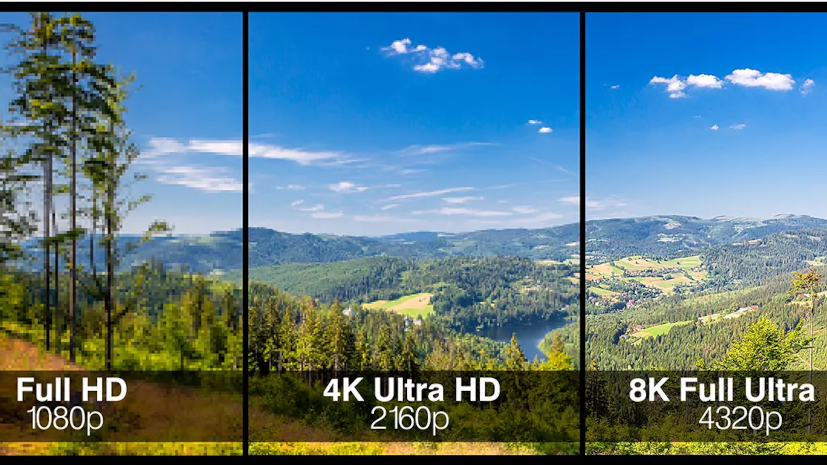
The term HD generally means "high definition". In practice, this refers to a video whose resolution is high enough to provide a sharp, detailed image. In everyday language, many users use "HD" to refer to any video that looks clean and pleasant to watch.
But perceived quality doesn't depend solely on resolution. A video can be 720p, 1080p or higher and still look disappointing if it has been overly compressed, poorly encoded, or already degraded at the source. Conversely, a low-resolution video can sometimes look acceptable on a small screen if it's well encoded.
In other words, when you're trying to download a video in HD without losing qualityyou should understand that several factors come into play:
- the quality of the original file;
- the available resolution;
- the level of compression;
- the format used;
- the way the video is retrieved;
- and sometimes even the screen it will be watched on.
So the right question isn't just: "Is it HD?"
The real question is: "Am I getting the best quality actually available?"
Can you download a video in a higher quality than the original?
No. It's a fundamental rule. You can't create real quality that doesn't exist in the source. If the original video is average, compressed, or posted in a low resolution, downloading it won't magically turn it into a super-sharp video.
This is an essential point to understand to avoid disappointment. Many people think a good downloader can "improve" the video. In reality, it mainly allows you to recover the best available version, but not inventing details missing from the original file.
By contrast, a good tool can make all the difference between:
- retrieve a clean, source-faithful version;
- or retrieve a degraded, poorly chosen, or overly compressed version.
The purpose of a service like All Downloader is therefore not to turn a bad video into a visual masterpiece. Its role is to let you obtain the the best possible quality from the available content.
Why does a downloaded video sometimes look worse than the original?
This is a common problem, and there are several possible reasons.
The first is that the user doesn't necessarily download the best available version. They may click too quickly on a lighter format, choose a standard quality when a cleaner version exists, or let the system grab a lower-performing variant.
The second reason is confusion between streaming playback and a downloaded file. Some platforms dynamically adjust quality based on the device, network and player. The image may look very good during playback, but that doesn't always mean all variants are equally easy to download or offered in the same way.
The third reason is the source file itself. Some videos are already heavily compressed before they’re even uploaded. They may look fine on a given platform but reveal their limits once downloaded and played back out of context.
Finally, you also have to take the screen into account. A video that looks great on a smartphone may appear mediocre on a larger monitor. It's not necessarily the download that's bad. Sometimes it's simply that the display reveals more of the content's limitations.
How to download an HD video without losing quality?
The principle is simple, but you must follow a few important rules. The goal is to get the best available version without picking a format that unnecessarily degrades quality.
Step 1: start with the correct video
The first thing to do is to make sure the original video itself is of good quality. If you're watching content that is already blurry or heavily compressed, downloading can't work miracles. Before starting the operation, you should therefore check whether the original video is sharp.
If the video exists in multiple versions or posts, it is often best to start from the best visible source.
Step 2: copy the correct link
Like with any download, everything starts with the URL. You need to copy the exact link of the video or post in question. A bad link, a partial link, or a general page instead of the specific video can lead to poor content detection, or even an error.
This step may seem simple, but it's one of the most important. A good download always starts with a good link.
If you land on a profile or page containing multiple videos instead of the content you wanted, consult our guide to get the exact link to a video.
Step 3: Use a suitable online downloader
That's where a service like All Downloader Comes into play. The advantage of a well-designed tool is that it quickly detects the source, offers the right formats, and simplifies the user journey. The user doesn’t need to install complex software. They simply paste the link, then choose the correct option if multiple quality levels are available.
This simplicity is essential, especially when you want to preserve maximum quality without getting lost in technical details.
Step 4: choose the best available quality
This is often the decisive step. If multiple options are offered, choose the cleanest, sharpest version that best suits your needs. A high-definition video will be more pleasant to keep, rewatch, and display on different devices.
A good rule is to avoid overly lightweight versions if visual quality is your priority. A smaller file can be convenient, but it may also be more heavily compressed.
Step 5: check the result on the right device
Once the video is downloaded, you should test it under proper conditions. Sometimes the user thinks they've lost quality when they're simply playing the video in an unsuitable player or environment. It's best to check it on a device and screen that match your actual use.
Downloading an HD video on mobile: is it a good idea?
Yes, of course. Many downloads are now done directly on smartphones, and this works very well as long as you use the right tool. But keep a few practical points in mind.
On mobile, video quality still matters, but so does storage. An HD video can be larger than a compressed file. So you need to make sure the device has enough free space. You also need to know where the file will be saved, especially on iPhone and Android where downloads can end up in different locations depending on the browser.
On iPhone, downloaded videos often go through Files before being moved if necessary into Photos. On Android, they are usually found in the folder Downloads or in the phone’s file manager app.
The advantage of mobile is speed. The user sees a video, copies the link, opens All Downloader and downloads the file immediately. The key is simply to manage the save location and the available space.
Downloading an HD video to a computer: what are the advantages?
The computer remains very handy for high-quality videos. First, it often provides better visual comfort for checking the final output. Second, it generally allows easier file management. Finally, storage space is often more generous, which helps if you download larger videos.
On PC or Mac, downloads generally go through the browser, then the file ends up in the folder Downloads. This makes it easier to sort, rename, archive, or reuse the content.
If you want to save an HD video to watch later on a large screen, a computer is often the most comfortable environment for handling the download.
The most common mistakes when trying to preserve good quality
Some mistakes are common and explain why a downloaded video may look worse than expected.
Choosing a version that's too low-quality
A smaller file isn’t always a good deal if you’re looking for quality. Trying to save a little space can sometimes cause you to lose a lot of sharpness.
Confusing speed with quality
Some users want to download as quickly as possible and don't take the time to check the available options. Result: they end up with a less interesting version than the one they could have obtained.
Forgetting the source quality
If the original video is mediocre, downloading it won't really improve it. You should always start from the best available content.
Viewing the file in the wrong context
A video can look worse if it's played in poor conditions, on an unsuitable screen, or with a player that mishandles certain visual settings.
Overloading the phone or computer
An HD video can take up more space. If the device runs low on storage, the download may fail or have issues.
Why does format matter as much as resolution?
Resolution matters, but it doesn't tell the whole story. Two videos displayed as having the same resolution can give a very different visual impression depending on their compression, encoding, and playback smoothness. That's why the format and how the file was prepared make a huge difference.
The user doesn't need to master all the technical details. They just need to understand that good quality isn't only a matter of numbers. It's a balance between sharpness, smoothness, file size, and fidelity to the source.
A good downloader should help you make that choice without complicating the experience.
How All Downloader precisely meets this need
All Downloader It has a clear advantage for this type of task: it simplifies access to the right file. Users want a fast, no-install tool that can handle multiple platforms and offer the best available quality when possible.
The ideal experience is simple:
- copy the link ;
- paste the URL ;
- let the tool detect the source;
- choose the right format;
- retrieve a clean, pleasant-to-watch video.
Conclusion
Learn download a video in HD without losing quality is now a real expectation of internet users. We no longer simply want to record a video. We want to preserve content that is clean, sharp, pleasant to watch, and faithful to the original.
To achieve this, you need to understand one essential thing: the final quality depends on the source, the correct link, the chosen format, and the tool used. You can’t create quality that isn’t present in the original file, but you can retrieve the best available version if you use the right method.
With a service like All DownloaderThe user can get straight to the point: copy their link, start detection, choose the right quality, and download the video easily—no software, no hassle. That's exactly what makes a good downloader today.